- NSFW Gallery
- Trending Tools
- prev
- next
Overview Of Nudez App
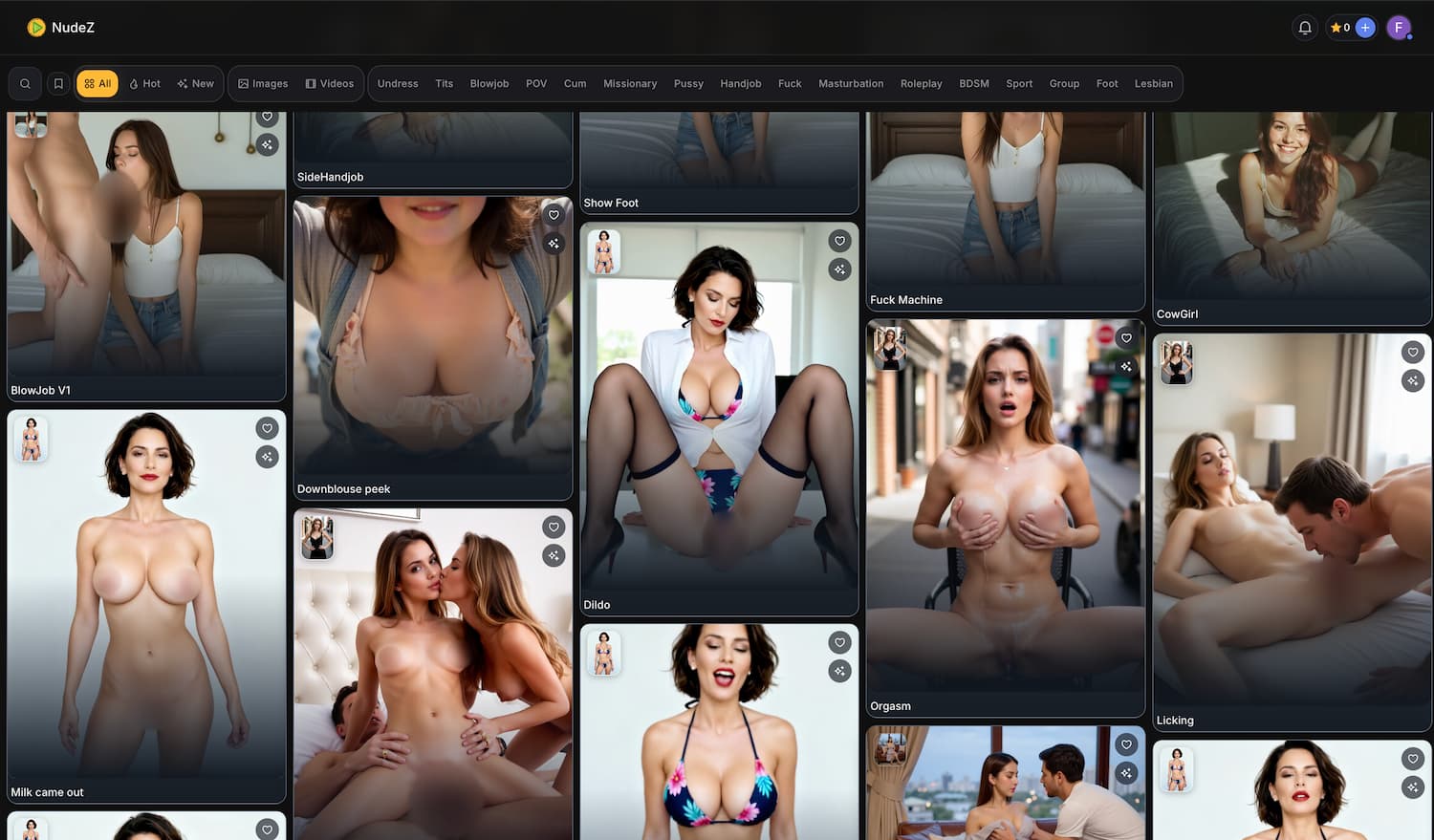
Nudez App is a browser-based AI tool that takes ordinary photos and turns them into AI nsfw pics or short AI porn videos using undress mode, image to video, text to image, image to image or multi image edit tools.
The platform is straightforward; You open the site, upload a picture, pick a ready-made template or type a short prompt, and the system generates the result in seconds. Everything stays inside the browser, so there is no software to download or install.
The main way most people use nudez.app is through its large collection of templates. These are grouped into clear categories such as AI Undress, Tits, Blowjob, POV, Cum, Missionary, Pussy, Handjob, Fuck, Masturbation, Roleplay, BDSM, Sport, Group, Foot, and Lesbian.
Each template shows a small preview of the kind of scene it produces, and you can filter the whole list by All, Hot, New, Images, or Videos, or simply search by name.
Two of the templates come with two free trials, which lets you see the quality before you spend any credits. The list includes scenes such as Squirt, Face Fuck, Multi-Titjob, CowGirl, Cum On Face, POV Missionary, Lick Pussy, Fuck Machine, Creampie, Footjob, Duet Blowjob, Threesome Lick, Breast Expansion, Gag, Lesbian Kiss, and many others that cover different positions and acts.
When you want more control over a still image, the Undress AI and image-edit modes give you extra options on top of the uploaded photo. You can choose a Mode such as plain AI Undress, X-Ray, Bikini, or BDSM. You can also set Breast size to Small, Medium, Large, or Huge, pick a Pussy haircut style (Shaved, Trimmed, Bush, or Dyed), select an Age appearance (Young, Adult, MILF, or Granny), and adjust Body type in Nudez App.
These settings keep the original face and pose while changing the rest of the body, so the result stays recognizable. There is also a Multi-image Edit feature that lets you upload two photos at once—one as the left image and one as the right—and then apply a template or prompt to both of them together. Uploaded files must be JPG or PNG and cannot be larger than 10 MB each; you can drag them in or choose them from images you already uploaded earlier.
AI porn image to video generation works through the Image to Video template. You upload a photo, choose a scene template, set the duration in seconds, pick the resolution (480p or 720p), and optionally add a short custom prompt. Membership unlocks videos longer than five seconds; free users are limited to shorter clips.
The same membership also unlocks 720p HD video, the ability to unblur generated images, full custom prompts, and direct downloads of the finished files. Credits are measured in Stars, and each job shows an estimated cost before you start (for example 100 Stars per creation). Free trials reduce that number so you can test without spending Stars right away.
Custom prompts are available in almost every mode in Nudez App. You can leave it empty and rely only on the template, or type extra instructions about lighting, expression, clothing details, or specific actions.
The same prompt field appears whether you are doing Text to Image, image-edit, Multi-image Edit, or Image to Video, so the workflow stays consistent no matter which route you take.
Once a generation finishes, the result appears in the Effect preview area and is saved to your History and Assets section so you can download it later. A small History tab on the side lets you flip back to earlier jobs without leaving the page.
The interface of Nudez App is simple and dark: the left side holds the upload area and controls, while the right side shows the live preview of the template or the finished result.
Before you generate anything you must check a box confirming that every subject is an adult and that you have the right to use the photo. The site is clearly aimed at adult users, and every screen includes a reminder that content involving minors is forbidden.
A membership plan is available if you plan to create a lot of content. It gives a 20 percent discount on AI porn image and video creation while the plan is active, plus the longer video lengths, 720p output, unblurred images, custom prompts, and unrestricted downloads mentioned above.
In everyday use the flow is straightforward: upload a photo, choose a template or write a short prompt, adjust a few settings if needed, and download the result. So, what are you waiting for? Check out demos generated using Nudez.app and then decide whether to try or not.
Key Features Of This Tool
- Preset Templates: Users choose from ready-made scene templates instead of writing prompts, with options grouped under Undress, Tits, Blowjob, POV, Cum, Missionary, Pussy, Handjob, Fuck, Masturbation, Roleplay, BDSM, Sport, Group, Foot, and Lesbian.
- AI Porn Image To Video: Selected templates generate AI porn videos (shorts) from an uploaded photo using the Image to Video mode.
- AI Undress Modes: Dedicated templates labeled Undress, Undress plus, and image-edit let users remove or alter clothing on photos.
- Multi-Image Edit: A template option called Multi-image Edit is available for working with more than one photo in a single generation.
- Free Trials: Multiple templates show a “2 free trials” badge so users can test generation without paying first.
Category Filters: Templates can be browsed and filtered by All, Hot, New, Images, or Videos. - Upload And Generate: The service is built around uploading a photo, picking a template, and generating the resulting image or video.
- Video Length: Videos can be generated up to 10 seconds long.
- Output Quality: Results can be produced at quality up to 720p.
- Custom Prompt: Users also have the option to enter their own custom prompt in addition to the preset templates.
- And more
Pricing Details For This AI
Free Trial:
- Free Credits
- Access to some options like undress ai, ai image to image porn, etc.
Paid Plan:
- Price starts at $5.99
- 600 stars (20 Images or 30 videos)
- Access to all the tools
Best Alternatives Of Nudez.App
Shortcode
You May Also Be Interested In


- Best AI Uncensored Image Editor For Bikini, Pregant, Undress, And Other Type Of Transformations!
- Multipupose NSFW AI With Tools Like AI Cloth Remover, Sexual Position Generator, Undress AI GIF Maker, FaceSwapper, Etc!

- One Platform With AI Undresser (Image As Well As Video), Faceswapper, NSFW Pose Generator, And More!
- AI Undress, Cumshot, Blowjob, Breast Enlarger, BDSM, And Other Types Of Porn Video And Image Maker With Other Types Of Tools!


- Lovescape offers Live AI Porn Cam, AI NSFW Videos Feed, AI Roleplay Chatbots, AI Porn Videos/Images Generator, Etc!